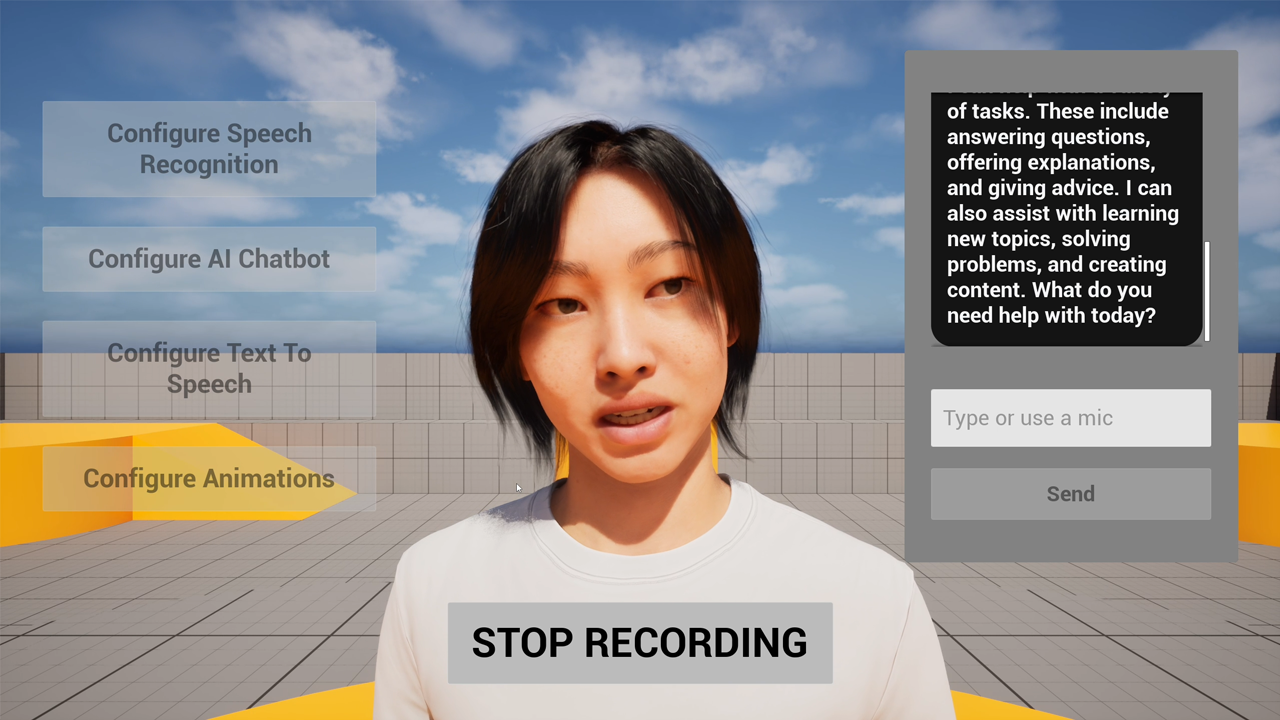
I recently put together a demo project that shows how to create fully interactive AI NPCs in Unreal Engine using speech recognition, AI chatbots, text-to-speech, and realistic lip synchronization. The entire system is built with Blueprints and works across Windows, Linux, Mac, iOS, and Android.
If you’ve been exploring AI NPC solutions like ConvAI or Charisma.ai, you’ve probably noticed the tradeoffs: metered API costs that scale with your player count, latency from network roundtrips, and dependency on cloud infrastructure. This modular approach gives you more control, run components locally or pick your own cloud providers, avoid per-conversation billing, and keep your players interactions private if needed. You own the pipeline, so you can optimize for what actually matters to your game. Plus, with local inference and direct audio-based lip sync, you can achieve lower latency and more realistic facial animation, check the demo video below to see the difference yourself.
Here’s an example of the real-time lip sync quality achievable with this system:
What This System Does
The workflow creates a natural conversation loop with an AI character:
- Player speaks into microphone → speech recognition converts it to text
- Text goes to an AI chatbot (OpenAI, Claude, DeepSeek, etc.) → AI generates a response
- Response is converted to speech via text-to-speech
- Character’s lips sync perfectly with the spoken audio
The speech recognition part is optional - you can also just type text directly to the chatbot if that works better for your use case.
The Plugin Stack
This implementation uses several plugins that work together:
- Runtime MetaHuman Lip Sync - Generates facial animation from audio ( documentation )
- Runtime Speech Recognizer - Converts speech to text (optional - you can also enter text manually) ( documentation )
- Runtime AI Chatbot Integrator - Connects to AI providers and TTS services ( documentation )
- Runtime Audio Importer - Processes audio at runtime ( documentation )
- Runtime Text To Speech - Optional local TTS synthesis ( documentation )
All plugins are designed to work together with Blueprint nodes, no C++ required.
Speech Recognition Setup
The speech recognizer is optional - if you prefer to enter text manually or already have text input from another source, you can skip this component entirely and feed text directly to the AI chatbot.
For voice input, the speech recognizer works offline and supports automatic language detection across 118 languages . You configure it once in the editor by downloading your preferred language model (ranging from the compact Tiny model to the accurate Large V3 Turbo), then it’s ready to use at runtime.
For better accuracy, especially in noisy environments, the system supports Voice Activity Detection (VAD) . I recommend using the Silero VAD extension, which uses a neural network to more reliably distinguish speech from background noise.
The system also works seamlessly in Pixel Streaming scenarios . Simply replace the standard Capturable Sound Wave with the Pixel Streaming variant to properly capture and process audio data from browser clients.
AI Chatbot Integration
The chatbot integration supports multiple providers out of the box:
- OpenAI (GPT-4, GPT-4o, etc.)
- Claude (Anthropic)
- DeepSeek
- Gemini (Google)
- Grok (xAI)
Streaming mode is crucial here - instead of waiting for the complete AI response, streaming lets you start generating speech as soon as the first tokens arrive. This cuts perceived latency significantly.
Text-to-Speech Options
You have flexibility between local and external TTS:
Local TTS ( Runtime Text To Speech ):
- Fully offline, no API costs
- Supports 45 languages with 900+ voices
- Includes the new Kokoro voice models for studio-quality output
- Works on all platforms
External TTS ( Runtime AI Chatbot Integrator ):
- OpenAI TTS
- ElevenLabs (highest quality, what I used in the demo)
- Google Cloud Text-to-Speech
- Azure Cognitive Services
Both support streaming synthesis, letting you start playing audio before the full text is processed.
Lip Sync Animation
The lip sync plugin handles the visual component of the system. It analyzes audio directly rather than text, which means it works with any language automatically - English, Chinese, Spanish, Japanese, whatever.
Realistic Model Lip Sync Example:
You get three model options:
Standard Model
- 14 visemes, optimized for performance
- Works on all platforms including Android and Meta Quest
- Requires a small extension plugin
Realistic Model
- 81 facial controls for MetaHuman/ARKit characters
- Much higher visual fidelity
- Three optimization levels (Original, Semi-Optimized, Highly Optimized)
Mood-Enabled Realistic Model
- Everything from Realistic Model
- 12 emotion types (Happy, Sad, Confident, etc.)
- Configurable intensity and lookahead timing
- Can output Full Face or Mouth Only controls
Standard Model Lip Sync Example:
For maximum quality, I used the Realistic Model in the demo. But for VR applications on Meta Quest, the Standard Model gives better frame rates while still looking good.
The plugin also supports custom characters beyond MetaHumans - Daz Genesis, Character Creator, Mixamo, ReadyPlayerMe, and any character with blend shapes.
Why CPU Inference?
The lip sync runs on CPU, not GPU. This might seem counterintuitive, but for small, frequent operations like lip sync (processing every 10ms by default), CPU is actually faster:
- GPU has overhead from PCIe transfers and kernel launches
- At batch size 1 with rapid inference, this overhead exceeds compute time
- Game engines already saturate the GPU with rendering and physics
- CPU avoids resource contention and unpredictable latency spikes
The transformer-based model is lightweight enough that most mid-tier CPUs handle it fine in real-time. For weaker hardware, you can adjust settings like processing chunk size or switch to a more optimized model variant.
Animation Blueprint Setup
Setting up the lip sync in your Animation Blueprint is straightforward:
- In the Event Graph, create your lip sync generator on Begin Play
- In the Anim Graph, add the blend node and connect your character’s pose
- Connect the generator to the blend node
The setup guide walks through this step-by-step, with different tabs for Standard vs Realistic models.
Audio Processing
The system connects audio through delegates. For example, with microphone input ( copyable nodes ):
- Create a Capturable Sound Wave
- Bind to its audio data delegate
- Pass audio chunks to your lip sync generator
- Start capturing
The audio processing guide covers different audio sources: microphone, TTS, audio files, and streaming buffers.
You can also combine lip sync with custom animations for idle gestures or emotional expressions.
Multilingual Support
Since the lip sync analyzes audio phonemes directly, it works with any spoken language without language-specific configuration. Just feed it the audio and it generates the appropriate mouth movements - whether that’s English, Mandarin, Arabic, or anything else.
Testing the Demo
You can try the complete system yourself:
- Download Windows demo (packaged, ready to run)
- Download source files (UE 5.6 project)
The demo includes several MetaHuman characters and shows all the features I’ve covered. It’s a good reference if you’re building something similar.
Performance Considerations
A few tips for optimization:
For mobile/VR:
- Use the Standard Model for better frame rates
- Increase processing chunk size (trades slight latency for CPU savings)
- Adjust thread counts based on your target hardware
For desktop:
- Realistic or Mood-Enabled models for maximum quality
- Keep default 10ms chunk size for responsive lip sync
- Use Original model type for best accuracy
General:
- Enable streaming for both AI responses and TTS to minimize latency
- Use VAD to avoid processing empty audio
- For the Realistic model with TTS, external services (ElevenLabs, OpenAI) work better than local TTS due to ONNX runtime conflicts (though the Mood-Enabled model supports local TTS fine)
Use Cases
This system enables quite a few applications:
- AI NPCs in games with natural conversations
- Virtual assistants in VR/AR
- Training simulations with interactive characters
- Digital humans for customer service
- Virtual production and real-time cinematics
The Blueprint-based setup makes it accessible even if you’re not comfortable with C++.
Wrapping Up
The combination of offline speech recognition, flexible AI integration, quality TTS, and realistic lip sync creates some genuinely immersive interactions. All the plugins are on Fab , and there’s extensive documentation if you want to dig into specific features.
For more examples and tutorials, check out the lip sync video tutorials or join the Discord community .
If you need custom development or have questions about enterprise solutions: [email protected]
Works with Unreal Engine 5.0 through 5.7 on Windows, Linux, Mac, iOS, Android, and Meta Quest.